
Have you ever wondered what happens when you type google.com into your browser and press Enter? In less than a second, a full website appears on your screen. It feels instant and effortless, but behind the scenes, multiple global servers and systems are working together to make that happen.
All of this takes place in just a few milliseconds — faster than the blink of an eye. If you’ve ever asked yourself, “What is DNS, and why is it so important?” the answer starts with understanding how the internet communicates behind the scenes.
The internet does not understand human-friendly names like google.com. Instead, it relies on numerical IP addresses — long numerical addresses that identify servers across the internet.
Since remembering these numbers for every website would be nearly impossible, we need a system that translates names into numbers quickly and accurately.
That system is called DNS, or Domain Name System. DNS acts like a translator between you and the internet, converting easy-to-remember domain names into machine-readable IP addresses in milliseconds. Without it, browsing the web would be confusing and inconvenient.
DNS is one of the most important technologies powering the internet, yet most people never notice it.
What Is DNS?
DNS stands for Domain Name System, and it plays a central role in how the internet works. If you’re wondering what DNS is in simple terms, it is the system that translates human-friendly domain names into machine-readable IP addresses.
So, what is DNS exactly? It’s the technology that allows you to type a simple name like google.com instead of remembering a long string of numbers. While people prefer easy-to-remember names, computers communicate using numerical IP addresses.
For example, when you type google.com, DNS converts it into an IP address such as 142.250.190.14. This numerical address tells your browser exactly where to find the website’s server anywhere in the world. Without the Domain Name System, you would need to memorize complex numbers for every website you visit, which would make browsing inconvenient and confusing.
The Domain Name System makes the internet practical and user-friendly by acting as a translator between humans and computers. It connects the names we understand with the numbers machines rely on to communicate, making your browsing experience fast, simple, and seamless.
What Is an IP Address?
So, what is an IP address? Simply put, it’s a unique numerical label assigned to every device connected to the internet. Think of it like a home address: just as a postal address tells the mail carrier exactly where to deliver a letter, an IP address tells computers where to send data across the internet. Every website, server, and device needs an IP address to communicate effectively.
There are two main types of IP addresses. IPv4 is the most common and uses a format like 192.168.1.1. It has been the standard for decades but has a limited number of addresses.
To solve this, IPv6 was introduced as a newer format with a much larger pool of addresses, allowing nearly every device in the world to have a unique identifier.
Computers rely entirely on IP addresses to communicate; domain names like google.com are simply convenient labels for humans. By converting names into IP addresses, devices can find each other, send data, and ensure websites and services load correctly.
Understanding IP addresses helps you see how the internet actually works behind the scenes and why DNS is essential for translating those numbers into the names we use every day.
Why DNS Is Important
So, why is DNS important? Simply put, it makes the internet easy for humans to use. We naturally remember names like google.com or facebook.com, not strings of numbers.
DNS translates those familiar names into the numerical IP addresses computers use to locate each other, making browsing the web and sending emails seamless.
Without this system, navigating the internet would be confusing, forcing us to memorize long, complicated numbers for every website or service we want to reach.
Beyond convenience, DNS ensures that websites and emails work reliably. Every time you open a website or send a message, DNS quickly connects your request to the correct server, keeping your online experience smooth and uninterrupted.
It also plays a vital role for businesses and services, helping them establish a recognizable presence online and making sure customers can find them easily.
In other words, DNS is the internet’s silent helper, quietly linking the names we understand with the machines that power the web. Understanding why DNS is important shows just how much this behind-the-scenes system keeps the internet running smoothly, allowing us to navigate, communicate, and interact online without ever having to remember the complex numbers behind the websites we visit every day.
How DNS Works (Step-by-Step)
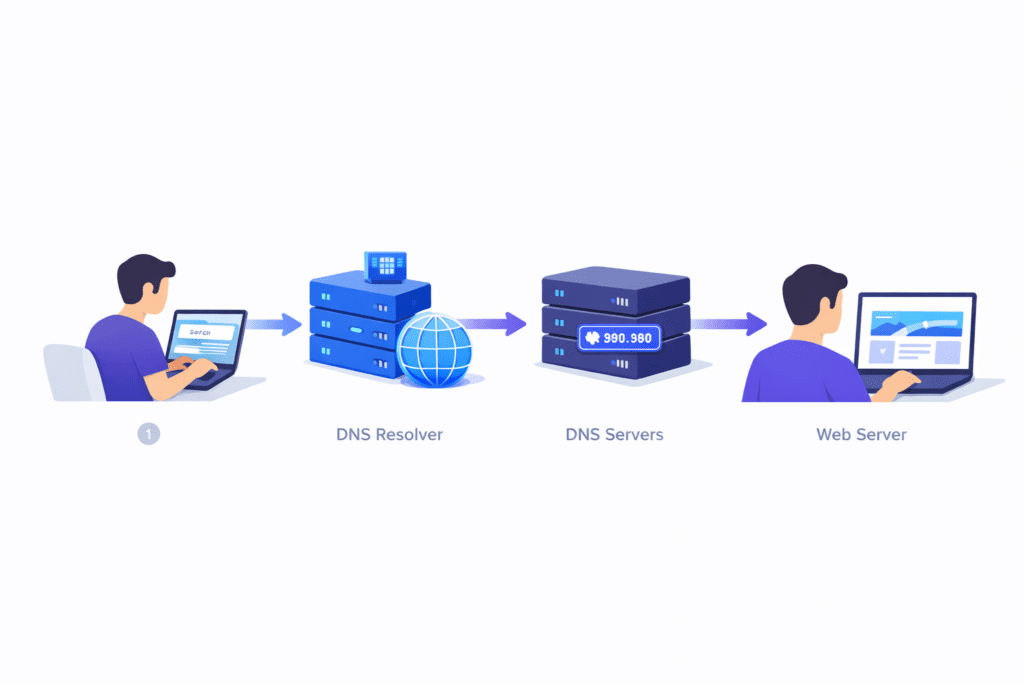
Understanding how DNS works helps make the invisible process of browsing the web much clearer. Although it all happens in just milliseconds, several servers work together behind the scenes to make sure your request reaches the right destination.
When you type a website name into your browser, the process begins. First, your browser checks its local cache to see if it already has the IP address stored. If it doesn’t, the request moves to a DNS resolver, which helps your computer locate the correct address.
The resolver then contacts a Root DNS server, which directs it to the appropriate Top-Level Domain (TLD) server, such as .com or .org. From there, the TLD server points to the Authoritative Name Server, which stores the exact IP address for that domain. Once the IP address is returned, your browser connects to the server and loads the site.
Along the way, caching at multiple levels helps speed up future visits, so the full lookup process doesn’t need to happen every time. By breaking it down step by step, you can see how DNS quietly keeps the internet running smoothly, translating human-friendly names into the numerical addresses computers rely on — all in just milliseconds.
While DNS mainly translates domain names into IP addresses, every lookup also generates valuable data about internet activity. This raw query data can be analyzed to detect trends, security threats, and user behavior patterns. If you’re curious how simple DNS requests turn into meaningful insights, read our guide on How DNS Data Becomes Intelligence: From Raw Queries to Actionable Insights.
DNS Resolution Flow Summary
To summarize, the journey from typing a website name to seeing the page on your screen happens through a fast chain of lookups working together. In simple terms, the request moves from you to your browser’s cache, then to a DNS resolver, and onward through Root, TLD, and Authoritative servers until the correct IP address is found, and the website can load.
It begins when you enter a domain name and your browser checks whether it already knows the address from a previous visit. If not, a resolver steps in and asks the wider DNS network for help. Each server directs the request closer to the final destination until the exact address is identified.
Once the correct IP address is returned, your browser connects directly to the website’s server and displays the page. Because many of these results are temporarily stored, future visits are even faster.
This streamlined process happens automatically in the background, guiding your request across the internet in a fraction of a second.
Key Components of DNS
To understand how this process works behind the scenes, it’s helpful to know that the DNS system is made up of several parts working together to locate the correct IP address for a website.
When you enter a domain name, the first stop is usually a DNS resolver, a service that receives your query and searches for the answer on your behalf. If the resolver doesn’t already have the information, it turns to Root Servers, which act as a top-level guide and point it toward the appropriate category of domain. From there, TLD Servers manage specific extensions such as .com, .org, or .net and direct the lookup closer to its destination.
Next, the search reaches the Authoritative Name Server, which stores the actual details about the domain and provides the precise IP address needed to connect.
Supporting all of this are DNS records, the stored data that link domain names to their corresponding IP addresses and other essential information.
Together, these components form a coordinated system that operates quietly in the background, ensuring that when you type a website name, your device can quickly find and connect to the correct server.
Common Types of DNS Records
Now that you know the key components of DNS, it helps to understand that DNS records are the actual pieces of information stored on DNS servers that tell the internet what to do when someone requests your domain.
Different record types handle different tasks. For example, an A Record connects a domain name to an IPv4 address, which allows a website to load in your browser.
An AAAA Record performs the same function for newer IPv6 addresses. Sometimes a domain points to another domain instead of directly to an IP address—this is handled by a CNAME Record, often used for subdomains such as “www” pointing to the main site.
Email delivery relies on MX Records, which direct messages to the correct mail servers so they reach the intended inbox. TXT Records store readable text information and are commonly used to verify domain ownership, confirm email services, or support security measures like spam protection.
Finally, NS Records specify which name servers are officially responsible for a domain, telling the internet where the authoritative information is located. Together, these records act as the instruction set that makes websites accessible, emails deliverable, and online services function reliably.
What Happens If DNS Fails?
DNS normally operates quietly in the background, so most people rarely notice it—until something goes wrong. When DNS fails, your internet connection may still appear active, but websites suddenly stop loading.
You might see messages like “server not found,” experience slow or inconsistent browsing, or find that apps and online services simply can’t connect at all. This happens because your device can no longer translate website names into the IP addresses needed to reach the correct servers.
On a larger scale, DNS problems can disrupt huge portions of the internet at once. For example, outages involving major infrastructure providers such as Cloudflare have temporarily made popular platforms and services unreachable worldwide.
During such incidents, users often assume the websites themselves are down, when in reality the system that directs traffic to them is failing. In one widely reported 2025 disruption, multiple major sites returned error messages simultaneously due to issues within Cloudflare’s network.
These situations highlight why DNS reliability is essential. Without a functioning system to guide requests to the right destinations, the internet would feel broken—even though the underlying networks and servers are still running.
Public DNS vs Private DNS
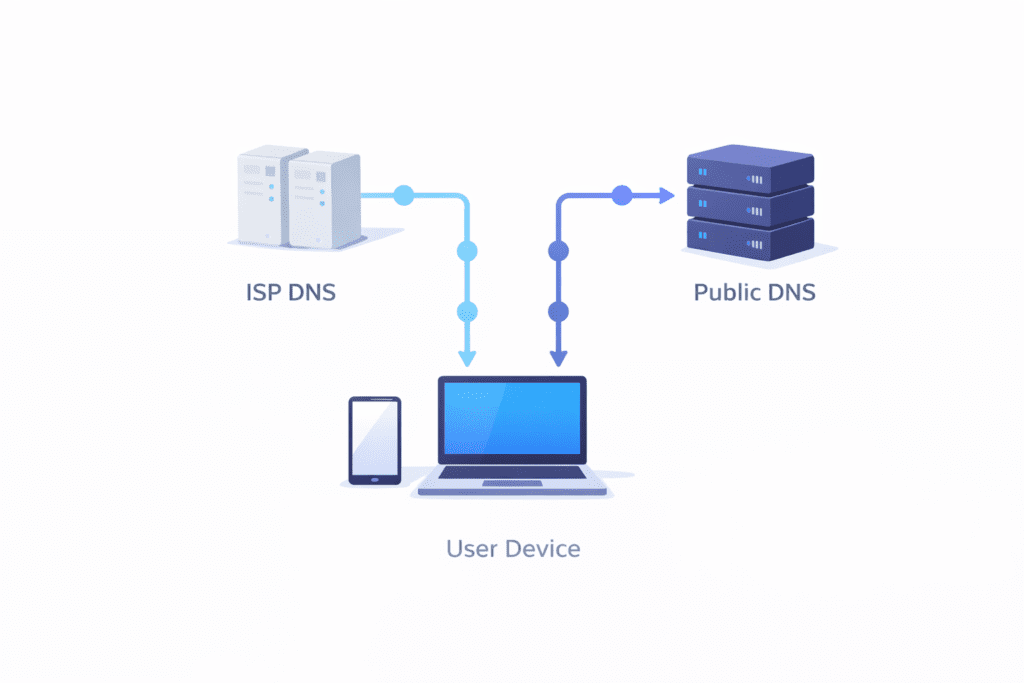
The service that translates website names into IP addresses doesn’t have to come only from your internet provider—you actually have a choice. By default, most people use a private DNS supplied automatically by their internet service provider (ISP).
This default service works quietly in the background and requires no setup, which is why most users never notice it. However, it also means every website lookup depends on your provider’s systems.
A public DNS, in contrast, is operated by independent organizations and is available for anyone to use. Well-known examples include Google Public DNS (8.8.8.8) and Cloudflare DNS (1.1.1.1). These providers run large global networks designed to answer requests quickly and remain stable even during heavy traffic.
Many people switch to public DNS because it can offer faster response times, improved reliability if an ISP service has issues, and stronger privacy practices.
Importantly, changing DNS providers does not change your internet connection speed directly—it simply changes who translates website names into addresses for you.
This flexibility lets users choose a service that best matches their priorities while keeping everyday browsing smooth and uninterrupted.
Is dns secure?

Although DNS is essential to how the internet functions, it was not originally designed with strong security protections in mind. Early DNS prioritized speed and reliability rather than privacy, which meant traditional DNS requests could potentially be exposed or altered as they traveled across networks.
In simple terms, the system worked well for locating websites, but it didn’t always confirm whether the information returned was authentic.
To address these limitations, modern security improvements have been introduced. DNSSEC (Domain Name System Security Extensions) uses digital signatures to verify that responses come from the correct source and haven’t been tampered with.
Newer technologies such as DNS over HTTPS (DoH) and DNS over TLS (DoT) add another layer of protection by encrypting DNS queries, making it much harder for outsiders to intercept, monitor, or modify your browsing activity.
Without these safeguards, attacks like DNS spoofing or cache poisoning could redirect users to fake or harmful websites without their awareness. Today, however, trusted DNS providers and built-in security features significantly reduce these risks.
While no system is completely immune to threats, DNS security has improved dramatically, helping ensure that most people can use the internet safely and with confidence.
The Domain Name System (DNS) is one of the invisible foundations that keep the internet running smoothly. It converts human-friendly domain names into the numerical IP addresses computers use to locate one another, making the web easy and accessible for everyone.
Without DNS, browsing would require remembering long, complicated number sequences just to reach a single site. Every time you click a link, watch a video, or send an email, DNS works quietly behind the scenes to guide your request to the correct destination.
It’s fast, seamless, and essential to almost everything you do online. The next time you open a website, remember — DNS is the unseen system that makes it load effortlessly.
Now that you understand the basics of how DNS works, you can explore more advanced topics such as DNS data analysis and intelligence gathering. Our related articles on DNS data and DNS intelligence explain how this essential internet system powers security tools, research, and modern digital infrastructure.
Frequently Asked Questions (FAQs)
What is DNS in simple terms?
DNS is like the Internet’s phonebook. It translates easy website names (like example.com) into the numerical IP addresses computers use to locate websites.
How long does a DNS lookup typically take?
In most cases, it takes only a fraction of a second. You usually don’t notice it because it happens instantly in the background when you open a website.
Can I change my DNS server?
Yes, you can choose a different DNS provider if you want. Switching DNS does not change your internet connection itself — it only changes who translates website names for you.
Is Google Public DNS safe?
Yes, it is widely considered safe, fast, and reliable. It is operated by Google and used by millions of people worldwide.
Why is DNS sometimes slow?
DNS can be slow if your provider’s servers are overloaded, far away, or experiencing technical issues. Switching to a faster or more reliable DNS service can sometimes improve browsing speed.
Overall, DNS is a normal part of how the internet works, and for most users, it runs smoothly without any special effort or technical knowledge.