
If you want to launch a website, one of the first things you need is hosting. Many beginners wonder:
What is hosting?
What is a server?
Can I host on my own computer?
How does hosting from another server work?
This article explains everything in simple terms and shows how hosting connects to the broader internet infrastructure, including DNS.
What Is Web Hosting?
Web hosting is a service that stores your website files on a server connected to the internet so people can access your site anytime.
In short:
Hosting = Renting space on a remote internet-connected server
Your website includes files such as:
HTML pages
Images and videos
Databases
Scripts and applications
These files must live on a system that is always online and able to respond to visitors.
What Is a Server?
A server is a powerful computer designed to store, process, and deliver data to other computers over a network.
Unlike a personal computer, servers are built for:
Continuous operation (24/7 uptime)
High performance
Handling many users simultaneously
Strong security and reliability
When someone visits your website, their device (client) requests data from the server, which then sends the website back to their browser.
Can You Use Your Own Computer as Hosting?
Yes — this is called self-hosting.
Your personal computer can act as a server and deliver your website to visitors.
Requirements for Self-Hosting
Computer running 24/7
Stable high-speed internet connection
Server software (Apache, Nginx, etc.)
Port forwarding is configured on your router
Public IP address or dynamic DNS
Strong security protection
Why Self-Hosting Is Rare for Public Websites
Self-hosting has significant limitations:
❌ Power outages take your site offline
❌ Home internet is slower than data centers
❌ Higher security risks
❌ Hardware failures can cause downtime
❌ Not scalable for large traffic
❌ Continuous electricity usage
👉 Self-hosting is best for learning, development, private tools, or experiments — not for business-critical websites.
How Hosting From Another Server Works
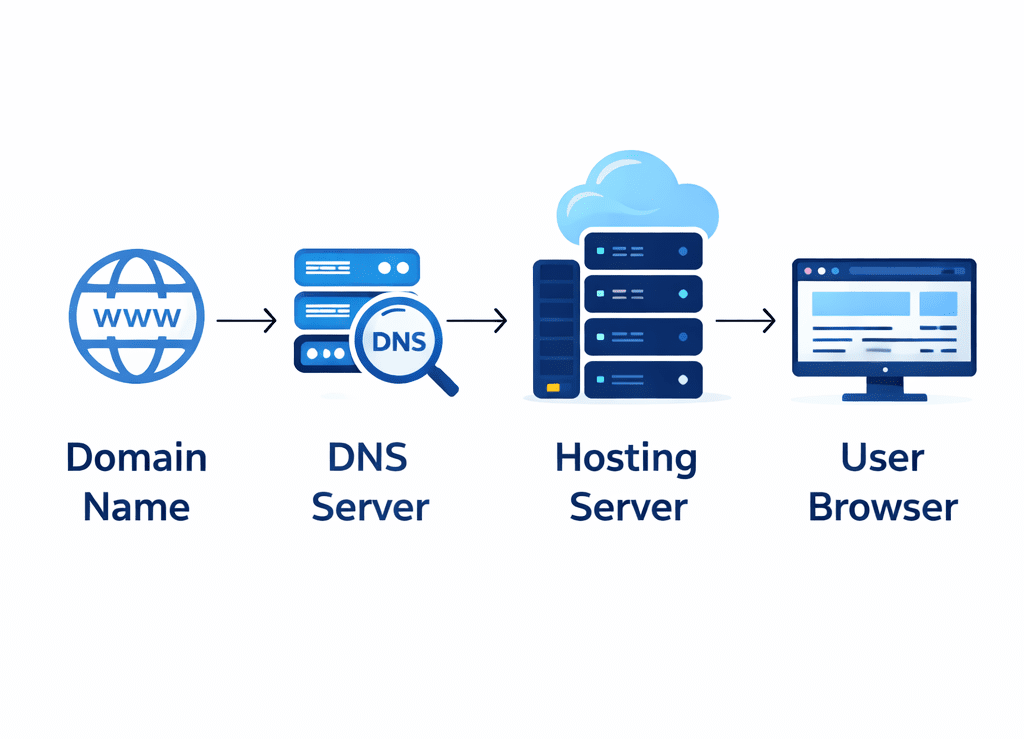
Most websites use professional hosting providers. These companies operate large data centers filled with specialized servers that run continuously.
Step 1: You Rent Server Space
You purchase a hosting plan that provides storage, computing power, memory, and bandwidth.
Step 2: Upload Your Website
You transfer your files to the server using:
Control panels (cPanel, Plesk)
FTP/SFTP software
Git deployment
Website builders
Step 3: Connect Your Domain Name
Your domain is linked to the hosting server through DNS settings.
Nameservers store DNS records that point your domain to the IP address of your hosting provider’s server.
Step 4: Visitors Access Your Website
Here’s what happens behind the scenes:
User enters your domain in a browser
DNS converts the domain into an IP address
Browser sends a request to the server
Server processes the request
Server sends website data back
Website appears on the screen
All of this typically happens in milliseconds.
Why Professional Hosting Is Better
Hosting companies provide infrastructure that individuals usually cannot maintain at home.
Key Advantages
✔ 24/7 uptime and reliability
✔ High-speed global network connections
✔ Advanced security protections
✔ Automated backups and recovery
✔ Ability to handle large numbers of visitors
✔ Technical support
✔ Easy scalability as your site grows
Security Considerations in Hosting
Security is a critical factor when choosing hosting.
Professional providers implement protections such as:
Firewalls and intrusion detection
DDoS mitigation
Regular system updates
Secure data centers
SSL certificate support
Monitoring and incident response
Self-hosted systems often lack these protections, making them more vulnerable to attacks.
Simple Real-World Analogy
Think of hosting like renting property:
🌐 Server = Apartment building
🧾 Hosting plan = Your rented unit
🧳 Website = Your belongings
👥 Visitors = Guests visiting your room
You don’t need to own the building to live there — you rent space inside it.
Common Types of Hosting
Shared Hosting
Multiple websites share one physical server
✔ Most affordable
✔ Easy to use
✔ Ideal for beginners and small sites
VPS Hosting (Virtual Private Server)
A physical server is divided into virtual private environments
✔ More control and performance
✔ Better isolation from other users
✔ Suitable for growing websites
Dedicated Hosting
An entire server dedicated to one customer
✔ Maximum performance and customization
✔ High cost
✔ Used by large or high-traffic sites
Cloud Hosting
Your site runs across multiple interconnected servers
✔ Highly scalable
✔ Very reliable
✔ Can handle traffic spikes
Managed Hosting
Provider handles maintenance, updates, and security
✔ Minimal technical effort required
✔ Ideal for businesses and non-technical users
How Hosting and DNS Work Together
DNS (Domain Name System) acts like the Internet’s phonebook. It translates human-readable domain names into IP addresses that computers use to locate hosting servers.
This global system is coordinated by organizations such as ICANN and supported by distributed nameservers worldwide.
When someone enters your domain:
DNS converts the domain name into an IP address
The browser contacts the hosting server at that address
The server sends back your website
Without DNS, users would need to remember numeric IP addresses instead of domain names.
Nameservers play a key role by storing DNS records that point your domain to the correct hosting provider.
Final Thoughts
Web hosting is the foundation of every website. While you can host a site on your own computer, professional hosting services are far more reliable, secure, and scalable.
👉 Simply put:
Hosting makes your website publicly accessible on the internet.
Without hosting, your website files may exist on your computer or in storage, but they are not available for people around the world to access online.
Frequently asked question
What is the difference between hosting and a server?
A server is a physical or virtual computer that stores and delivers website data. Hosting is a service that provides access to server resources so your website can be available on the internet.
Do I need hosting if I already have a domain name?
Yes. A domain name is your website’s address, while hosting stores your website files. Without hosting, your domain will not display a website and may show a parked or error page.
How does DNS connect a domain to hosting?
DNS (Domain Name System) translates your domain name into the IP address of your hosting server, allowing browsers to locate and load your website.
Can I host a website on my own computer?
Yes, but it requires a stable internet connection, server software, security setup, proper network configuration, and 24/7 uptime. Self-hosting is generally recommended only for learning or testing.
What type of hosting is best for beginners?
Shared hosting is usually best for beginners because it is affordable, easy to manage, and does not require advanced technical knowledge.
What is cloud hosting?
Cloud hosting runs your website on multiple connected servers instead of a single physical machine, improving reliability and scalability.
Is hosting important for website speed?
Yes. Hosting quality affects loading speed, uptime, and performance. Faster servers, better infrastructure, and optimal server location improve user experience.
What happens if my hosting expires?
If your hosting plan expires and is not renewed, your website becomes inaccessible until the service is restored. Some providers may offer a short grace period.
What are nameservers in hosting?
Nameservers store DNS records that point your domain to the IP address of your hosting server, connecting your domain to the correct location on the internet.
Is web hosting secure?
Professional hosting providers implement security measures such as firewalls, monitoring, and backups. However, website owners must also maintain proper security practices.