
Email is one of the oldest yet most critical communication systems powering the modern internet. Even in an era dominated by instant messaging and social media, email remains the backbone of digital communication for businesses, governments, and online platforms worldwide.
It is used not only for everyday conversations but also for critical online functions such as account registration, password recovery, official communication, marketing campaigns, financial notifications, and automated system alerts.
Nearly every online service relies on email infrastructure in some capacity. When users create accounts, receive verification links, reset passwords, or get security alerts, email systems operate behind the scenes to ensure that these messages are delivered reliably and securely.
Due to its central role, email infrastructure has become a foundational component of the global internet ecosystem.
One of the key technologies that enables email delivery is the Domain Name System (DNS). DNS functions as the Internet’s directory service, translating human-readable domain names into machine-readable records that email servers use to route messages.
In particular, MX (Mail Exchange) records stored in DNS specify which mail servers are responsible for receiving emails for a domain. When an email is sent, the sending mail server queries DNS to locate the correct destination server using these MX records.
However, incorrectly configured DNS settings can cause significant problems. Misconfigured email records may result in delivery failures, emails being flagged as spam, or even serious security vulnerabilities. Attackers often exploit weak or missing email authentication settings to perform spoofing, phishing, and domain impersonation attacks.
To address these risks, modern email systems rely on authentication mechanisms such as SPF (Sender Policy Framework) and DKIM (DomainKeys Identified Mail), which use DNS records to verify that messages originate from authorized sources.
This guide explains how email infrastructure works from a technical perspective. It explores the core protocols that power email communication, including SMTP (Simple Mail Transfer Protocol) for sending messages and IMAP (Internet Message Access Protocol) and POP3 (Post Office Protocol version 3) for retrieving them. The guide also examines how DNS records, authentication mechanisms, and security configurations work together to ensure reliable, efficient, and secure email delivery across the internet.
Types of Email Systems on the Internet
Email systems on the internet are not all the same. Different individuals and organizations use different types of email infrastructures depending on their needs, technical capabilities, security requirements, and cost considerations. Some users prefer simple free email services, while businesses often require professional domain-based email or even fully self-hosted email servers.
Understanding the different types of email systems helps explain how email is deployed and managed across the internet. In general, email systems can be divided into four main categories: free webmail services, custom-domain email systems, self-hosted email servers, and email-forwarding systems.
1. Free Webmail Services
Free webmail services are the most widely used email systems for personal communication. These services are fully hosted and managed by large technology companies, allowing users to create and access email accounts without managing any technical infrastructure.
Popular examples include Gmail and Outlook.com. Users can access these platforms through web browsers, mobile applications, or desktop email clients. The providers manage everything behind the scenes, including mail servers, storage, spam filtering, and security updates.
Free webmail services offer several advantages. They are easy to set up, require little or no technical knowledge, provide generous storage capacity, and include built-in security features such as spam filtering and malware protection.
However, they also have limitations. Users have little control over the underlying email infrastructure, customization options are limited, and accounts may be subject to the provider’s policies, service limitations, or advertising models.
2. Custom Domain Email
Custom domain email systems are commonly used by businesses, organizations, and professionals who want email addresses associated with their own domain name instead of a public email provider.
For example:
admin@dnsintelligence.net
Using domain-based email helps organizations present a more professional identity while strengthening brand credibility and trust.
To implement custom domain email, organizations configure DNS records—especially MX (Mail Exchange) records—that direct incoming email traffic to their chosen email hosting provider.
Many organizations use hosted business email platforms such as Google Workspace or Zoho Mail. These services provide domain-based email hosting along with administrative controls, enhanced security features, collaboration tools, and scalable infrastructure for business communication.
3. Self-Hosted Email Servers
Some organizations choose to operate their own email infrastructure by running self-hosted mail servers. In this approach, the organization manages the entire email environment, including mail transfer agents, storage systems, authentication mechanisms, and security configurations.
Common mail server software includes Postfix and Exim, which are widely used on Linux-based servers to send and receive email using the SMTP protocol.
Self-hosting offers several advantages, including full control over the email infrastructure, enhanced privacy, and greater flexibility for customization. However, it also introduces significant technical challenges. Administrators must manage DNS configuration, spam filtering systems, server security, IP reputation, and authentication technologies such as SPF, DKIM, and DMARC.
Without proper configuration and monitoring, self-hosted email servers may face deliverability issues or have their messages flagged as spam by major email providers.
4. Email Forwarding Systems
Email forwarding systems provide a simpler alternative for individuals, startups, or small projects that want professional domain-based email addresses without operating a full email hosting environment.
In this setup, emails sent to a domain address are automatically redirected to another mailbox.
For example:
contact@domain.com → forwarded to Gmail
When a message arrives at the domain’s mail server, forwarding rules automatically redirect the email to another destination account. This allows users to maintain a professional domain-based email address while managing messages through an existing email service.
Startups and small projects often use email forwarding to reduce costs and simplify infrastructure management. However, forwarding systems still require proper DNS configuration and email authentication settings to prevent spam filtering issues and ensure reliable message delivery.
How Email Travels Across the Internet
Every time an email is sent, a series of automated processes takes place behind the scenes to ensure that the message reaches the correct destination. Although this process typically happens within seconds, it involves several systems working together, including email clients, mail servers, internet protocols, and the Domain Name System (DNS). Understanding this process helps explain how email delivery functions and why proper configuration of DNS and email infrastructure is essential for reliable communication.
Below is a simplified step-by-step explanation of how an email travels across the internet from the sender to the recipient.
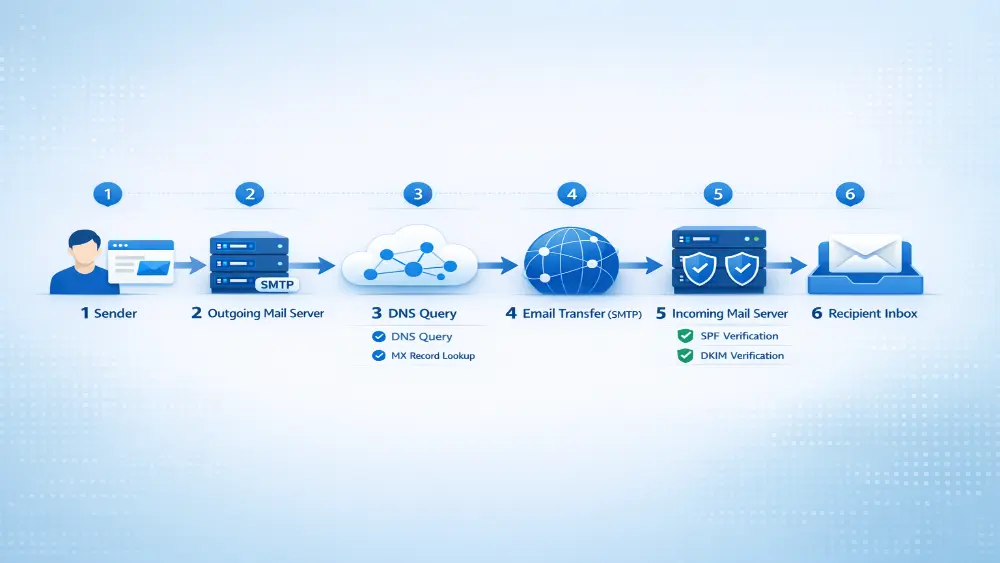
Step 1: Email Creation
The process begins when a user composes an email using an email client or webmail interface. This could be a browser-based service such as Gmail, a mobile email application, or a desktop client such as Microsoft Outlook or Mozilla Thunderbird.
The user writes the message, enters the recipient’s email address, includes a subject line, and attaches any files if necessary. Once the user clicks the Send button, the email client prepares the message and submits it to an outgoing mail server for delivery.
At this stage, the email contains several important components, including the sender’s address, recipient’s address, subject line, message body, message headers, and any attachments.
Step 2: Sending via SMTP
After the email is created, it is transmitted to an outgoing mail server using SMTP.
SMTP is the standard protocol used for sending email across the Internet. It defines how email messages are transferred from the sender’s email client to the sender’s mail server and how they are relayed between different mail servers.
When the email client sends the message, it connects to an SMTP server responsible for processing outgoing mail. The server checks the message structure, verifies the sender, and determines where the email should be delivered. Once the message is accepted, the SMTP server begins the process of locating the recipient’s mail server.
Step 3: DNS Lookup for MX Records
To deliver the email, the sending mail server must determine which server handles email for the recipient’s domain. This is where the Domain Name System (DNS) plays a critical role.
The sending server performs a DNS query to locate the MX (Mail Exchange) records associated with the recipient’s domain. MX records specify which mail servers are responsible for receiving email for that domain.
For example, a DNS MX record might look like this:
example.com MX 10 mail.example.com
This record tells sending mail servers that email messages for example.com should be delivered to the mail server mail.example.com, with the number 10 representing the priority value.
If multiple MX records exist for a domain, the sending server typically attempts delivery based on priority, starting with the lowest number.
Step 4: Email Delivery to the Recipient’s Mail Server
Once the sending server identifies the destination mail server, it establishes a connection using SMTP and transfers the email message.
The receiving server runs a Mail Transfer Agent (MTA), which is responsible for accepting incoming email messages and processing them. During this stage, the server may perform several security checks, including spam filtering, malware scanning, and email authentication verification using technologies such as SPF, DKIM, or DMARC.
If the message passes these checks, it is accepted and stored in the recipient’s mailbox on the mail server.
Step 5: Email Retrieval by the Recipient
After the email has been successfully delivered to the recipient’s mail server, the recipient can access it using an email client.
Two common protocols are used to retrieve email messages:
- IMAP
- POP3
IMAP allows users to access and manage their email directly on the server while keeping messages synchronized across multiple devices. This approach is widely used today because it enables users to read the same email from smartphones, laptops, and other devices.
POP3, on the other hand, typically downloads messages from the mail server to a local device and may remove them from the server afterward. This method was more common in earlier email systems but is still used in certain environments.
Together, these protocols and systems allow email messages to travel across the internet quickly and reliably, enabling global communication within seconds.
Key DNS Records Used for Email
The Domain Name System (DNS) plays a central role in modern email infrastructure. DNS records help email servers determine where messages should be delivered and whether those messages are legitimate. Without properly configured DNS records, email systems would struggle with message routing, authentication, and security.
Several DNS record types are specifically designed to support email delivery and protect domains from abuse. The most important ones include MX records, SPF records, DKIM records, and DMARC policies. Together, these records help ensure that email messages are delivered to the correct mail servers while also reducing the risk of spoofing, phishing, and other email-based attacks.
1. MX Records
MX (Mail Exchange) records are one of the most fundamental DNS record types used in email delivery. Their primary purpose is to specify which mail servers are responsible for receiving email for a particular domain.
When someone sends an email to an address such as:
user@example.com
The sending mail server queries DNS to locate the MX records for example.com. These records tell the sending server which mail server should receive the message.
MX records also include a priority value, which determines the order in which mail servers should be contacted. Mail servers with lower priority numbers are tried first. If the primary mail server is unavailable, the sending server can attempt delivery to a backup server with a higher priority number.
Properly configured MX records are essential for ensuring reliable email delivery across the internet.
2. SPF Records
SPF (Sender Policy Framework) is an email authentication mechanism designed to prevent sender address spoofing. It allows domain owners to specify which mail servers are authorized to send email on behalf of their domain.
SPF records are published in DNS as TXT records. When a receiving mail server gets an email, it checks the SPF record of the sender’s domain to verify whether the sending server is permitted to send messages for that domain.
A typical SPF record might look like this:
v=spf1 include:_spf.google.com ~all
In this example, the record indicates that mail servers listed under _spf.google.com are authorized to send email for the domain. The ~all mechanism represents a soft fail policy, meaning unauthorized senders may be flagged but not immediately rejected.
SPF helps reduce spam and phishing attempts by making it more difficult for attackers to impersonate legitimate domains.
3. DKIM
DKIM (DomainKeys Identified Mail) provides another layer of email authentication by using cryptographic signatures to verify the integrity and authenticity of email messages.
When an email is sent, the sending mail server generates a digital signature using a private cryptographic key. This signature is added to the email header.
The receiving mail server then retrieves the corresponding public key from the domain’s DNS records and uses it to verify the signature.
If the signature is valid, the receiving server can confirm that:
- The email was authorized by the domain owner
- The message content has not been altered during transmission
DKIM helps protect against message tampering and strengthens the trustworthiness of email communications.
4. DMARC
DMARC (Domain-based Message Authentication, Reporting, and Conformance) builds on SPF and DKIM to provide a policy framework for handling authentication failures.
DMARC allows domain owners to specify how receiving mail servers should respond if an email fails SPF or DKIM verification. It also provides reporting mechanisms that allow domain owners to monitor how their email domain is being used across the internet.
A basic DMARC policy record may look like this:
v=DMARC1; p=reject
This policy instructs receiving mail servers to reject messages that fail authentication checks. Other common policies include:
- None – Monitor email authentication results without taking action
- quarantine – Send suspicious messages to spam or junk folders
By combining SPF, DKIM, and DMARC, organizations can significantly improve email security and protect their domains from spoofing, phishing, and unauthorized email use.
| Record Type | Purpose | Security Role |
| MX | Defines mail servers | Email routing |
| SPF | Authorizes senders | Prevents spoofing |
| DKIM | Cryptographic signature | Message integrity |
| DMARC | Policy & reporting | Anti-phishing enforcement |
Email Security Threats and Attacks
Email is one of the most widely used communication systems on the internet, but it is also one of the most frequently targeted by cybercriminals. Because email is widely trusted by users and heavily used by businesses and online platforms, attackers often exploit it to deliver malicious messages, steal sensitive information, or spread malware.
Many email-based attacks rely on social engineering techniques, where attackers manipulate users into trusting a fraudulent message. Others exploit weaknesses in email authentication systems or domain configuration to impersonate legitimate organizations.
Understanding these threats is essential for individuals, businesses, and administrators who want to protect their email systems and users.Below are some of the most common email security threats found on the internet today.
1. Phishing Attacks
Phishing attacks are one of the most common forms of email-based cybercrime. In a phishing attack, an attacker sends fraudulent emails that appear to come from a trusted organization in order to trick users into revealing sensitive information.
Attackers often impersonate well-known companies such as PayPal or Microsoft. The email may claim that there is a problem with the user’s account, request password verification, or instruct the user to click a link to resolve an urgent issue.
These emails usually contain links to fake websites that closely resemble legitimate login pages. When victims enter their credentials, attackers capture the information and may use it to gain unauthorized access to accounts, financial data, or corporate systems.
Phishing attacks are highly effective because they exploit human trust and urgency, rather than technical vulnerabilities.
2. Domain Spoofing
Domain spoofing occurs when attackers send emails that appear to originate from a trusted domain. In these attacks, the sender address may look legitimate, making it difficult for recipients to immediately recognize the email as fraudulent.
Without proper email authentication mechanisms—such as SPF, DKIM, and DMARC—attackers can forge the “From” address in an email header to make it appear as though the message was sent by a legitimate domain.
For example, an attacker might send a message that appears to come from:
support@company.com
Even though the email was actually sent from a malicious server.
Domain spoofing is commonly used in phishing campaigns and Business Email Compromise (BEC) attacks because recipients are more likely to trust emails that appear to come from familiar domains.
3. Look-Alike Domain Attacks
Look-alike domain attacks, also known as typosquatting, involve registering domain names that closely resemble legitimate domains. Attackers rely on subtle visual differences to deceive users.
For example:
micros0ft-support.com
paypaI-login.com
In these examples, characters such as the number 0 are substituted for the letter o, or a capital I is used instead of a lowercase l. These small differences can easily go unnoticed by users.
Attackers use these domains to send phishing emails, host fake login pages, or distribute malware. Because the domain appears similar to the legitimate brand, users may mistakenly trust the message and interact with the malicious content.
Typosquatting is a common tactic used in phishing campaigns targeting large companies and widely used online services.
4. Compromised Email Accounts
Another serious threat involves compromised email accounts. In this scenario, attackers gain access to a legitimate user’s email account through phishing attacks, weak passwords, or malware infections.
Once inside the account, the attacker can send emails directly from the legitimate mailbox. Because the messages originate from a real account, they often bypass spam filters and appear trustworthy to recipients.
Compromised accounts are frequently used in Business Email Compromise (BEC) attacks, where attackers impersonate executives, financial staff, or trusted partners to request payments or sensitive information.
Since the email is sent from a legitimate account belonging to the organization, recipients are much more likely to believe the message is genuine.
Understanding these threats highlights the importance of strong email security practices, including proper DNS configuration, email authentication technologies, user awareness training, and continuous monitoring of email systems.
| Attack Type | Description | Goal |
| Phishing | Fake emails pretending to be trusted organizations | Steal credentials |
| Domain Spoofing | Forged sender addresses | Impersonation |
| Look-Alike Domains | Typosquatted domains | Trick users into visiting fake sites |
| Compromised Accounts | Real email accounts used by attackers | Bypass security |
DNS Intelligence for Detecting Malicious Email Infrastructure
Cybersecurity researchers and threat intelligence teams often rely on DNS intelligence to identify and track malicious email infrastructure. Because modern email systems depend heavily on the Domain Name System (DNS) for routing and authentication, DNS data can reveal valuable insights about suspicious domains, phishing campaigns, and attacker-controlled infrastructure.
By analyzing DNS records and domain activity, researchers can identify patterns that indicate malicious behavior. These insights allow security teams to detect threats early, block harmful domains, and protect users from phishing attacks and fraudulent email campaigns.
Below are several common techniques used in DNS intelligence to detect malicious email infrastructure.
Monitoring Newly Registered Domains
One of the most effective techniques used by security researchers is monitoring newly registered domains. Cybercriminals frequently register new domains to launch phishing campaigns or impersonate legitimate brands.
For example, attackers may register domains that resemble popular services such as Microsoft or PayPal. These domains are often used to send phishing emails, host fake login pages, or distribute malware.
By monitoring newly registered domains in real time, DNS intelligence systems can detect suspicious registrations and identify potential phishing infrastructure before large-scale attacks begin.
Analyzing Suspicious MX Records
Another important technique involves analyzing MX (Mail Exchange) records associated with domains. Attackers sometimes configure unusual or suspicious MX records that point to newly created mail servers or infrastructure previously linked to spam or phishing campaigns.
Security researchers often analyze MX configurations to identify patterns such as:
Domains using the same mail servers across multiple suspicious registrations
Mail servers hosted in high-risk networks or cloud environments
Rapid changes in MX records associated with active phishing campaigns
These indicators can help identify malicious email infrastructure operating behind domains that may appear legitimate at first glance.
Detecting Shared Phishing Infrastructure
Attackers frequently reuse infrastructure across multiple phishing campaigns. For example, several malicious domains may share the same mail server, hosting provider, or DNS configuration.
By analyzing DNS data, researchers can detect these shared patterns and link multiple domains to a single attacker-controlled infrastructure. This approach enables security teams to identify entire phishing networks instead of blocking domains individually.
Detecting shared infrastructure is particularly useful for uncovering large-scale phishing operations that target thousands of users simultaneously.
Tracking DNS Hosting Patterns
Another important DNS intelligence technique involves analyzing DNS hosting patterns. Many malicious domains are registered and hosted using similar providers, registrars, or DNS services.
Security analysts examine patterns such as:
Domains registered in bulk through the same domain registrar
Repeated use of specific DNS hosting providers
Similar domain naming structures across phishing campaigns
These patterns often reveal relationships between seemingly unrelated domains and help researchers map the broader infrastructure used by attackers.
Importance of DNS Intelligence Platforms
Because DNS data is constantly changing, security teams rely on specialized DNS intelligence platforms to collect, analyze, and monitor large volumes of DNS information.
These platforms aggregate data from domain registrations, DNS records, passive DNS feeds, and global DNS queries to identify suspicious activity in real time. By analyzing this information, researchers can detect phishing campaigns, identify malicious email infrastructure, and monitor emerging threats across the internet.
DNS intelligence platforms are especially valuable for cybersecurity professionals because they provide early visibility into attacker infrastructure, allowing organizations to respond quickly and prevent large-scale email attacks.
In today’s evolving threat landscape, DNS intelligence has become an essential tool for detecting, analyzing, and disrupting malicious email operations before they can cause widespread harm.
Best Practices for Secure Email Infrastructure
Email remains one of the most important communication tools for businesses and individuals. However, it is also one of the most frequently targeted channels for cyberattacks. Misconfigured email systems can expose organizations to threats such as phishing, domain spoofing, and business email compromise (BEC).
To reduce these risks, organizations must follow security best practices when configuring and managing their email infrastructure. Proper DNS configuration and authentication mechanisms play a critical role in ensuring that email systems remain secure and trustworthy.
Below are several key recommendations that help improve the security and reliability of modern email infrastructure.
1. Configure SPF Correctly
SPF (Sender Policy Framework) is one of the first layers of email authentication. It allows domain owners to specify which mail servers are authorized to send email on behalf of their domain.
To configure SPF correctly, organizations must create a DNS TXT record that lists all legitimate sending servers and services. These may include email hosting platforms, marketing tools, and cloud applications that send messages using the organization’s domain.
A properly configured SPF record helps receiving mail servers verify the legitimacy of incoming messages. This significantly reduces the risk of attackers spoofing the domain in phishing or spam campaigns.
2. Enable DKIM Signing
DKIM (DomainKeys Identified Mail) adds another critical layer of protection by attaching a cryptographic signature to outgoing email messages.
When an email is sent, the mail server generates a digital signature using a private key. The receiving server then retrieves the corresponding public key from the domain’s DNS records to verify the signature.
This verification confirms two important things:
The email was authorized by the domain owner
The message content was not altered during transmission
By enabling DKIM signing across all email services, organizations can improve email trust, strengthen authentication, and increase overall email deliverability.
3. Set Strict DMARC Policies
DMARC (Domain-based Message Authentication, Reporting, and Conformance) builds on SPF and DKIM by providing a policy framework for handling authentication failures.
DMARC allows domain owners to instruct receiving mail servers on how to handle emails that fail authentication checks. Organizations often begin with a monitoring policy and gradually move toward stricter enforcement.
Example DMARC policy:
Copy code
v=DMARC1; p=reject
This policy instructs receiving mail servers to reject messages that fail SPF or DKIM authentication. Implementing strict DMARC policies greatly reduces the success rate of domain spoofing and phishing attacks.
4. Monitor DNS Records Regularly
DNS records associated with email infrastructure should be monitored regularly to ensure they remain accurate and secure. Changes in MX, SPF, DKIM, or DMARC records can directly affect both email delivery and security.
Security teams should periodically review DNS configurations to detect:
Misconfigurations
Unauthorized modifications
Outdated authentication records
Regular monitoring also helps identify suspicious changes that could indicate an attempted attack against the domain.
5. Use Domain Monitoring Tools
Organizations can further strengthen their defenses by using domain monitoring and threat intelligence tools. These platforms track newly registered domains, suspicious DNS activity, and potential brand impersonation attempts.
For example, attackers often register look-alike domains that closely resemble legitimate brands in order to launch phishing campaigns. Domain monitoring tools can detect these registrations early and alert security teams before attacks escalate.
By continuously monitoring domain activity and DNS patterns, organizations can quickly identify threats and take proactive steps to protect their users and email infrastructure.
Future of Email Security
Email security continues to evolve as cyber threats become more sophisticated. Attackers constantly develop new techniques to bypass traditional security controls, forcing organizations and security professionals to adopt more advanced protection strategies. In the coming years, several emerging technologies and security models are expected to significantly improve how email threats are detected and prevented.
AI-Based Phishing Detection
One of the most important trends in email security is the use of AI-based phishing detection. Modern phishing attacks have become increasingly convincing, often using realistic language, brand impersonation, and well-crafted social engineering tactics.
Artificial intelligence and machine learning systems can analyze large volumes of email data, including message content, behavioral patterns, and communication context. These systems can detect subtle anomalies that traditional spam filters might miss, allowing organizations to identify phishing attempts before they reach users.
DNS Threat Intelligence Platforms
Another growing area is the development of DNS threat intelligence platforms. These platforms collect and analyze large amounts of DNS data to identify suspicious domains, phishing infrastructure, and malicious email campaigns.
By monitoring domain registrations, DNS configurations, and global DNS activity, security teams can detect emerging threats earlier and respond more quickly. DNS intelligence has become an important tool for identifying attacker infrastructure before large-scale phishing campaigns begin.
Improvements in Email Authentication
Email authentication technologies are also continuing to evolve. Protocols such as SPF, DKIM, and DMARC are being adopted more widely across organizations to prevent domain spoofing and unauthorized email usage.
As more domains implement strict authentication policies, it becomes significantly harder for attackers to impersonate trusted organizations through email.
Zero-Trust Communication Systems
Another emerging concept is the adoption of zero-trust communication models. In a zero-trust environment, no message or sender is automatically trusted—even if it appears to come from a familiar source.
Instead, every communication attempt must pass multiple verification checks before it is accepted. This approach reduces the risk of compromised accounts, spoofed messages, and internal phishing attacks.
As email remains a critical communication platform for businesses and individuals, these innovations will play an essential role in strengthening email security and protecting users from increasingly advanced cyber threats.
Email remains one of the most essential communication systems on the internet, supporting everything from personal conversations to critical business operations. Behind the scenes, email delivery depends heavily on DNS infrastructure, which determines how messages are routed, authenticated, and verified across global networks. Without properly configured DNS records, email systems would struggle with reliability, security, and trust.
Key DNS records such as MX, SPF, DKIM, and DMARC play a vital role in ensuring that emails reach the correct servers and originate from authorized sources. When these records are properly configured, organizations can significantly reduce the risk of phishing attacks, domain spoofing, and other email-based threats.
Beyond basic configuration, DNS intelligence has become an important tool for detecting malicious email infrastructure. By monitoring domain registrations, analyzing DNS patterns, and identifying suspicious configurations, security teams can uncover phishing campaigns and disrupt attacker infrastructure before large-scale attacks occur.
As cyber threats continue to evolve, maintaining secure email infrastructure requires continuous attention. Organizations and administrators should regularly review DNS records, implement strong email authentication policies, and monitor their domains for suspicious activity.
Ultimately, secure DNS configuration is not just a technical necessity—it is a critical foundation for protecting modern email communication and maintaining trust across the internet.
1. What is email infrastructure?
Email infrastructure refers to the systems and technologies that enable sending, receiving, and storing email messages. It includes mail servers, DNS records, and core protocols such as SMTP, IMAP, and POP3 that work together to ensure reliable email communication.
2. How does email work with DNS?
DNS helps email servers locate the correct destination using MX (Mail Exchange) records. When an email is sent, the sending server queries DNS to find the recipient’s mail server and then delivers the message to that server.
3. What is an MX record in email?
An MX (Mail Exchange) record is a DNS record that specifies which mail server is responsible for receiving emails for a domain. It also includes priority values, allowing backup mail servers to receive messages if the primary server is unavailable.
4. What is SMTP, and how does it work?
SMTP (Simple Mail Transfer Protocol) is the protocol used to send outgoing emails. It transfers messages from the sender’s email client to the sender’s mail server and then to the recipient’s mail server across the Internet.
5. What is the difference between IMAP and POP3?
IMAP allows users to access and manage emails directly on the mail server, keeping messages synchronized across multiple devices. POP3 downloads emails to a local device and typically removes them from the server, limiting access from other devices.
6. What is SPF in email security?
SPF (Sender Policy Framework) is a DNS-based authentication method that defines which mail servers are authorized to send email on behalf of a domain. It helps prevent attackers from spoofing the domain in phishing emails.
7. What is DKIM, and why is it important?
DKIM (DomainKeys Identified Mail) uses cryptographic signatures to verify that an email was sent by an authorized domain and that its content has not been altered during transmission. It improves email integrity and trust.
8. What is DMARC, and how does it improve email security?
DMARC (Domain-based Message Authentication, Reporting, and Conformance) builds on SPF and DKIM by defining how receiving servers should handle authentication failures. It also provides reports to domain owners, helping them monitor and protect their domains from abuse.
9. Why is email security important?
Email security is important because email is a major target for phishing, spoofing, and malware attacks. Strong security measures help protect sensitive data, prevent unauthorized access, and ensure safe communication for users and organizations.
10. How can I secure my email domain?
You can secure your email domain by properly configuring SPF, enabling DKIM signing, implementing a strict DMARC policy, and regularly monitoring your DNS records. Using domain monitoring tools can also help detect suspicious activity early.