
“What if AI could continue working for you even after you close your laptop?”
For years, tools like ChatGPT, Claude, and Gemini have reshaped how people search for information, write content, brainstorm ideas, and interact with software. They’ve made AI feel less like a niche tool and more like a daily companion. But despite their progress, most of these systems still share a fundamental limitation: they are reactive. They wait for prompts, respond to instructions, and stop the moment the conversation ends.
But the next phase of AI may involve something far more ambitious.
Across the tech industry, there is a growing shift toward autonomous AI agents—software systems designed not just to respond, but to act. Instead of functioning as passive assistants, these systems are being designed to monitor information, execute workflows, organize tasks, and handle multi-step processes in the background. Imagine an AI that can summarize your emails, prepare meeting notes, and schedule follow-ups without being asked each time. This shift marks a broader evolution in AI automation, where software begins to behave less like a chatbot and more like a persistent digital co-worker.
That transition is exactly where Google believes Gemini Spark fits in.
Introduced at Google I/O 2026, Gemini Spark is positioned as an always-on AI assistant—a cloud-based AI agent designed to remain active even when the user is offline. Rather than living inside a single chat window, it is built to operate across Google’s ecosystem, integrating with tools like Gmail, Docs, Calendar, and Drive. In practice, this means it could potentially monitor tasks, organize information, generate summaries, and automate multi-step workflows in the background.
This reflects a broader industry movement. AI systems are increasingly moving beyond conversational interfaces toward tools that can reason, plan, and execute actions. The goal is shifting from building systems that simply answer questions to creating AI productivity tools that reduce repetitive digital work and proactively assist users throughout their day.
In many ways, this raises a deeper question about how we interact with software itself. If AI agents can continuously manage schedules, process information, and coordinate workflows without constant prompting, the traditional app-based model of computing may begin to feel very different.
To understand why Google sees Gemini Spark as a potential turning point in this evolution, it’s worth taking a closer look at what the system actually is—and how it is designed to work.
Gemini Spark at a Glance
Before exploring how Gemini Spark works in detail, it helps to look at the platform from a high level. This quick overview highlights the core features and capabilities of Google’s latest AI agent initiative in a fast, easy-to-scan format.
Key Takeaways
- Announced at Google I/O 2026 as part of Google’s broader AI strategy
- Designed as an always-on AI agent rather than a traditional chatbot
- Runs continuously in the cloud instead of only during active conversations
- Integrates with Gmail, Docs, Calendar, Drive, and other Google Workspace apps
- Built to automate multi-step workflows and repetitive digital tasks
- Focused on proactive task management instead of simple reactive chat
- Intended to monitor, organize, and assist users across connected services
- Expected to support future third-party app integrations and external workflows
- Represents Google’s growing focus on autonomous AI productivity tools
Why This Section Matters
Quick-reference sections like this make complex AI topics easier to understand, especially for readers scanning articles on mobile devices. A concise “at a glance” format also helps summarize the most important details about Gemini Spark without overwhelming readers with technical explanations too early in the article.
Structured overview sections like this are also more effective for featured snippets, AI-generated summaries, and fast-reading search experiences across modern search platforms.
What Is Gemini Spark?
At its core, Gemini Spark is Google’s attempt to move AI beyond the limits of a traditional chatbot. Instead of waiting for users to open an app and type a prompt, Gemini Spark is designed to function as an always-on AI agent — a cloud-based system that can continue operating in the background across connected apps and services.
In simple terms, Gemini Spark is built to keep working even when the user is not actively interacting with it. Most AI assistants today are reactive: users ask questions, issue commands, or start conversations, and the AI responds in real time. Once the interaction ends, the system largely stops working.
Gemini Spark is designed around a different idea: persistence.
Google describes it as an always-on AI assistant capable of monitoring tasks, organizing information, and helping automate workflows continuously in the background. Rather than acting only during active chat sessions, Gemini Spark is intended to proactively assist users across tools like Gmail, Google Docs, Calendar, and Drive.
One of the easiest ways to understand the concept is by comparing a chatbot with an AI agent.
A chatbot is mainly conversational. It waits for prompts, answers questions, and responds to instructions. An AI agent, by contrast, is designed to take action over time. It can potentially monitor information, organize tasks, plan workflows, and execute multi-step actions with less direct supervision from the user.
For example, imagine receiving several emails about an upcoming meeting. A traditional chatbot might summarize those emails only after you manually paste them into a conversation. Gemini Spark, however, is designed around a more autonomous approach. In theory, it could identify the meeting details automatically, summarize key points, create reminders, organize related files, and prepare follow-up tasks in the background.
That shift from reactive interaction to proactive assistance is what makes Gemini Spark different from traditional digital assistants.
Voice assistants like Siri or Google Assistant were primarily built around direct commands — users ask for information or request simple actions, and the system responds immediately. Gemini Spark appears to move beyond that model by focusing more heavily on persistent AI and autonomous task execution. The emphasis is less about answering isolated questions and more about continuously helping users manage digital work across apps and services.
While many details about Gemini Spark’s long-term capabilities are still emerging, the broader idea reflects a growing shift in AI automation: moving from systems that simply respond to prompts toward systems designed to actively assist users behind the scenes.
That naturally leads to the next question: how does Gemini Spark actually work, and what technologies allow it to operate as an always-on AI agent?
Why Google Created Gemini Spark
The race to build AI assistants is no longer centered on chatbots. Companies like OpenAI, Anthropic, Microsoft, and Google are now competing to define a new category of software built around AI agents — systems designed not just to respond to prompts, but to take action across apps and workflows.
That shift helps explain Google’s direction with Gemini Spark.
Rather than improving search or conversation alone, Google appears to be moving toward what could be called an “AI action layer.” The idea marks a subtle but important change in strategy: from helping users find information to helping them complete tasks. It builds on Google’s long-standing role in organizing digital information, extending it into organizing digital work.
At the center of this shift is the rise of agentic AI — systems that can carry out multi-step tasks such as scheduling, summarizing, organizing, or coordinating information across tools. Unlike traditional chatbots that only respond when prompted, these systems are designed to operate with persistence and context over time.
This is where Gemini Spark fits into Google’s broader ecosystem. With deep integration across Gmail, Docs, Calendar, and Drive, an always-on AI assistant can sit across the productivity layer itself — reducing repetitive actions like managing emails, preparing meeting notes, or updating schedules.
For example, instead of handling each task separately, an AI agent could detect an upcoming meeting in email, generate a summary of relevant documents, and update the calendar automatically in the background. This type of AI automation reflects a broader industry shift toward systems that manage workflows rather than just answer questions.
As a result, competition in AI is no longer only about chat quality. It is increasingly about control of the productivity layer — the space where users actually get work done. In that context, AI-powered productivity tools become strategically more important than standalone assistants.
Gemini Spark, then, is best understood not as an isolated experiment but as part of Google’s longer-term strategy: embedding AI across its ecosystem and preparing for a future where users interact less with individual apps and more with a coordinated, always-on AI assistant.
That evolution is still early, and questions around reliability, privacy, and real-world usefulness remain open. But the direction is clear — the industry is moving from reactive chat interfaces toward persistent AI systems capable of autonomous task execution.
Understanding that shift sets the stage for the next question: how Gemini Spark actually works behind the scenes and what makes an always-on AI agent technically possible.
How Gemini Spark Works
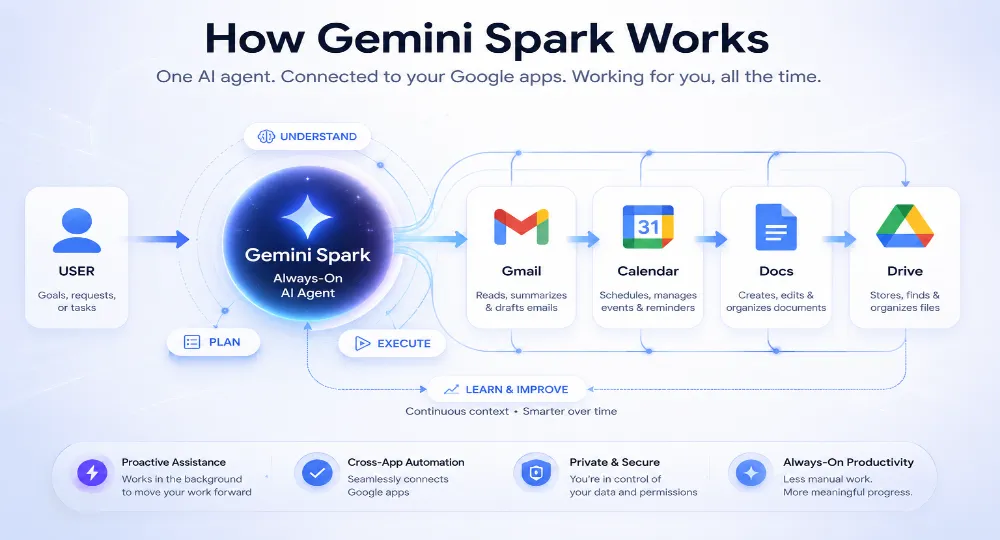
Unlike traditional chatbots that only respond during active conversations, Gemini Spark appears designed to operate continuously across Google’s ecosystem as an always-on AI agent. Rather than functioning inside a single chat window, the system is intended to work in the background, helping users manage information, coordinate tasks, and automate parts of their daily workflows.
At a basic level, Gemini Spark likely runs on Google Cloud infrastructure while using Gemini AI models to interpret information and maintain context across services such as Gmail, Docs, Calendar, and Drive. Through APIs and system integrations, the AI can potentially connect information between apps instead of treating every interaction as a separate task.
For example, if several emails mention an upcoming meeting, Gemini Spark could theoretically identify key discussion points, organize related documents, update schedules, and prepare reminders automatically. The focus is less on isolated conversations and more on coordinating ongoing workflows behind the scenes.
Several technologies likely support this system. Gemini AI models provide reasoning and language capabilities, while Google Cloud enables continuous operation across connected services. Agentic AI architecture helps the system move beyond simple responses toward action-oriented behavior, and workflow automation systems allow tasks to flow between applications more efficiently.
Google may also use frameworks such as Model Context Protocol (MCP), which helps AI systems maintain context and interact with external tools more effectively. While many implementation details remain unclear, the broader idea is straightforward: creating an AI assistant that stays aware of ongoing tasks rather than resetting after every interaction.
That is the key difference between Gemini Spark and traditional AI chatbots. Most chatbots wait for prompts and operate session by session. Gemini Spark, by contrast, appears designed around persistence — shifting AI from a reactive tool into a proactive assistant that can continuously support users across digital workflows.
Understanding that operational model helps explain the next layer of Gemini Spark: the practical features and capabilities users may eventually experience in everyday productivity tasks.
Key Features of Gemini Spark
One of the defining ideas behind Gemini Spark is that it appears designed to assist users continuously across connected apps and services rather than functioning as a standalone chatbot. Instead of responding only when prompted, the system aims to help manage productivity tasks proactively throughout the workday.
6.1 Always-On AI Assistance
Gemini Spark is built around persistent AI assistance. Rather than stopping when a conversation ends, the system may continue operating through Google’s cloud infrastructure even after users close apps or devices.
In practice, that could include monitoring incoming emails, tracking deadlines, organizing schedules, or generating reminders automatically. The focus appears to be less about isolated conversations and more about ongoing task coordination.
6.2 Deep Google Workspace Integration
A major advantage of Gemini Spark is its potential integration with Google Workspace apps including Gmail, Google Docs, Google Sheets, Google Calendar, and Google Drive.
Because the system is embedded directly within Google’s ecosystem, it may coordinate information across services more efficiently than browser-based automation tools. Instead of manually switching between apps, users could potentially rely on Gemini Spark to organize documents, update schedules, summarize information, and assist with routine administrative work.
6.3 Multi-Step Workflow Automation
Gemini Spark also appears designed to support multi-step workflow automation rather than handling one request at a time.
For example, the system could potentially:
Read an incoming email
Extract important information
Create a related document
Draft or send a response
Schedule a meeting reminder
That type of coordinated workflow is notably different from traditional chatbots, which typically respond to individual prompts without maintaining ongoing task awareness.
6.4 Proactive Notifications and Monitoring
Another important capability is proactive monitoring. Gemini Spark may eventually assist users through deadline reminders, email summaries, meeting preparation notes, project tracking, and follow-up suggestions.
Instead of requiring constant manual input, proactive AI systems aim to reduce routine organizational overhead and help users stay informed automatically.
6.5 Third-Party App Support
Although Gemini Spark is closely connected to Google Workspace, future integrations may extend beyond Google’s own ecosystem. Potential support for platforms like GitHub, Notion, Slack, Canva, Dropbox, and Trello could allow broader workflow automation across external services.
Google may eventually support these integrations through APIs or interoperability standards such as Model Context Protocol (MCP), allowing AI systems to communicate more effectively with connected tools.
Together, these features help illustrate how Gemini Spark could evolve from a conversational assistant into a broader AI productivity layer integrated across everyday digital workflows.
Real-World Gemini Spark Use Cases
Gemini Spark becomes easier to understand when viewed through practical workflows rather than abstract AI concepts. Instead of functioning as a standalone chatbot, the system appears designed to assist users continuously across schedules, documents, communication tools, and connected applications. That creates a wide range of possible productivity use cases across both personal and professional environments.
7.1 Personal Productivity
For individual users, Gemini Spark could help reduce routine administrative work throughout the day. The system may assist with organizing inboxes, scheduling meetings, creating reminders, and managing files across connected apps.
For example, instead of manually tracking deadlines buried inside emails and calendar invites, users might rely on Gemini Spark to surface important dates, organize schedules, and prepare reminders automatically. The focus is less on replacing decision-making and more on simplifying repetitive digital tasks.
7.2 Business Automation
Businesses may use Gemini Spark to streamline operational workflows that normally require constant coordination between employees and software tools. Possible use cases include updating CRM systems, generating reports, managing customer support tickets, and coordinating internal workflows across teams.
Rather than repeatedly moving information between platforms manually, AI agents could help organize data flow and maintain workflow continuity. For smaller teams, especially, that type of AI automation may reduce administrative overhead and improve efficiency. In future, Gemini spark will help in workflows convert into agentic AI. To know more about it read our article automation vs agentic AI that shaped how business will run work in future.
7.3 Content Creation
Gemini Spark could also support creators, marketers, researchers, and other knowledge workers handling large amounts of information. Potential workflows include drafting blog posts, organizing research summaries, preparing presentations, and planning social media content.
Instead of replacing human creativity, the system appears better suited for accelerating production workflows by helping users organize notes, summarize information, and prepare early drafts more efficiently.
7.4 Student and Education Use Cases
Students may benefit from proactive organizational support across academic workflows. Gemini Spark could assist with assignment reminders, study planning, lecture summarization, and note organization.
For learners managing multiple courses and deadlines, proactive AI systems may help reduce information overload by keeping schedules, materials, and study tasks organized within a single workflow.
7.5 Developer Workflows
For developers, Gemini Spark may eventually support project coordination and information management rather than direct code generation. Possible workflows include monitoring GitHub repositories, tracking bugs and pull requests, organizing development tasks, and generating documentation summaries.
In fast-moving software projects, that type of coordination could help teams stay organized without constantly switching between collaboration, project management, and documentation tools.
These examples help illustrate why AI agents are becoming increasingly important across the software industry — and why Gemini Spark is likely to be compared closely with competing AI assistants from companies like OpenAI, Anthropic, and Microsoft.
Comprehensive Comparison: How Gemini Spark Stack Up
To see where Gemini Spark sits in the broader technology landscape, it helps to compare it directly against both standalone conversational models and legacy digital assistants.
| Feature | Google Assistant (Legacy) | ChatGPT / Claude (Standard) | Gemini Spark (Agentic) |
| Primary Interface | Voice commands | Chat window / Prompts | Background automation & UI |
| Operational State | Reactive (Quick commands) | Reactive (Session-based) | Proactive (Always-on) |
| Context Retention | Minimal (Immediate task) | Moderate (Within single chat) | High (System-wide persistence) |
| Workflow Scope | Single actions (e.g., Set timer) | Text/Code generation tasks | Complex, multi-step actions |
| Ecosystem Depth | Smart home / Mobile OS | Broad API plug-ins | Deep Google Workspace layer |
While ChatGPT and Claude remain industry benchmarks for creative writing, deep brainstorming, and standalone coding tasks, their experience remains inherently prompt-driven. Gemini Spark trades away some of that conversational focus to prioritize system-wide task execution.
Why Gemini Spark Matters
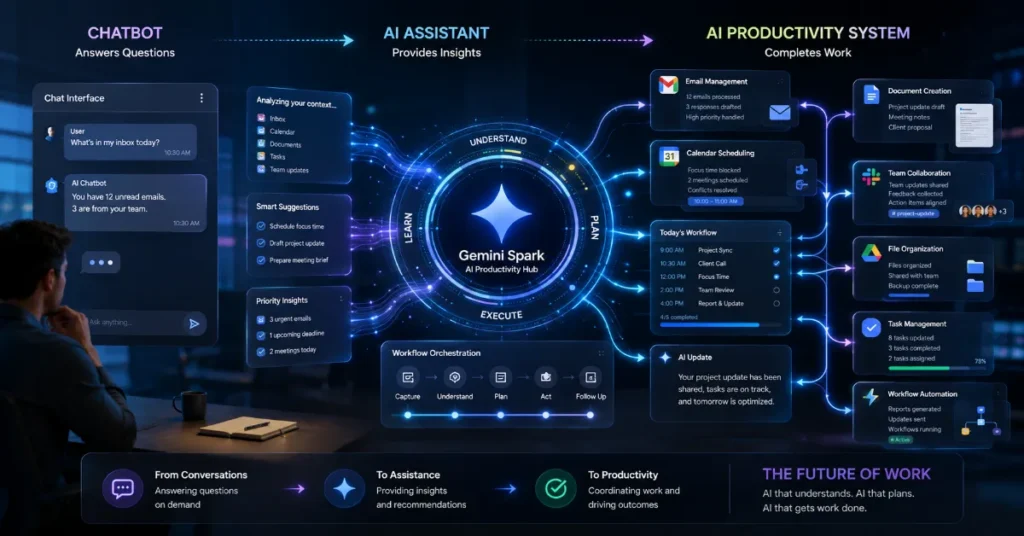
Gemini Spark appears positioned within broader movement toward AI-native productivity systems. Rather than functioning purely as a standalone chatbot, it could potentially operate across services like Gmail, Docs, Calendar, and Drive to help users coordinate information and workflows more efficiently.
That shift may prove strategically important because traditional software still requires users to constantly switch between apps, documents, meetings, and communication tools. AI-powered productivity environments aim to reduce some of that friction by turning AI into a coordination layer across connected services.
In that sense, Gemini Spark could represent an early step toward AI-powered operating environments where AI acts less like a search tool and more like an organizational system for digital work. Whether that vision fully materializes remains uncertain, but it reflects a broader industry direction already reshaping how companies think about AI productivity and workflow automation.
At the same time, the rise of always-on AI systems also raises important questions around privacy, reliability, and how much responsibility users are comfortable delegating to AI assistants.
Limitations and Risks of Gemini Spark
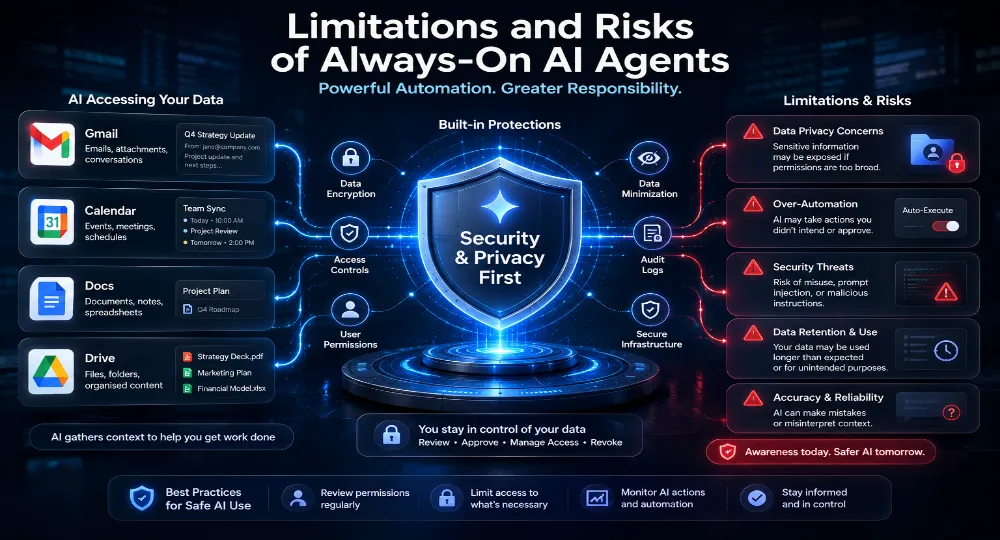
Every major shift in productivity technology brings both advantages and trade-offs, and always-on AI systems are no exception. While Gemini Spark may improve efficiency and reduce repetitive digital work, systems with continuous access to apps, files, and communication tools also raise important questions around privacy, security, reliability, and human oversight.
11.1 Privacy Concerns
One of the biggest concerns surrounding Gemini Spark is the level of access an always-on AI assistant may require to function effectively. To coordinate tasks across Gmail, Google Docs, Calendar, Drive, and other connected services, the system could potentially access large amounts of personal or organizational data.
That naturally raises concerns around user permissions, sensitive information exposure, and how continuously monitored activity is managed over time. Even with strong security protections, many users and businesses may remain cautious about granting AI systems broad visibility into emails, files, schedules, and internal communications.
11.2 Security Risks
As AI tools move beyond generating responses and begin performing actions, automation mistakes may carry greater consequences. Incorrect scheduling, accidental file sharing, or unintended task execution could create operational problems if users rely too heavily on automated systems.
There are also concerns around over-permissioned AI tools. If a single AI agent is connected across multiple services, even small errors could potentially affect several workflows simultaneously. That makes reliability, safeguards, and permission management especially important for always-on AI productivity systems.
11.3 AI Dependency
Another challenge involves growing dependence on AI automation. As systems like Gemini Spark become more capable of organizing schedules, managing reminders, and coordinating tasks, users may gradually reduce manual oversight of everyday work.
While that could improve efficiency, it may also encourage over-reliance on AI-generated recommendations, summaries, or decisions without consistent human verification. Maintaining a balance between automation and human judgment will likely remain important as AI assistants become more integrated into digital workflows.
11.4 Current Limitations
Many details surrounding Gemini Spark also remain unclear. The technology appears to still be in an early or limited-access stage, and questions remain around scalability, long-term reliability, and real-world performance at a larger scale.
Pricing and monetization models are also uncertain. Like many emerging AI productivity systems, Gemini Spark appears promising conceptually, but its practical effectiveness remains largely unproven.
Those limitations reflect a broader reality across the AI industry: while always-on AI assistants may represent a major shift in digital productivity, their long-term success will likely depend on how well companies balance automation, compete with other top automation tools in 2026, and provide reliability, privacy, and user trust.
The Future of AI Agents
Systems like Gemini Spark reflect a broader shift happening across the AI industry. For years, most AI assistants were designed primarily to answer questions, generate text, or respond to prompts during active conversations. Increasingly, however, technology companies appear focused on building AI agents capable of managing tasks, maintaining context, and assisting users across connected software environments.
One emerging idea is the rise of AI-powered digital workers designed to handle portions of repetitive knowledge work. Rather than replacing human employees, these systems may help manage administrative coordination, scheduling, reminders, reporting, and routine operational tasks that often consume large portions of the workday. In practice, that could mean AI assistants helping teams organize projects, reduce manual coordination, and streamline everyday productivity workflows.
The industry is also exploring multi-agent environments, where specialized AI systems work together across connected services. One agent could manage scheduling, another document organization, while others handle communication workflows or project coordination. Instead of operating as isolated chatbots, future AI systems may increasingly function as collaborative layers integrated throughout software ecosystems.
That broader transition could eventually reshape how people interact with software itself. Rather than constantly switching between apps, calendars, documents, communication tools, and project dashboards, users may increasingly rely on AI systems to coordinate information and tasks across services. In that sense, AI could gradually evolve from a standalone assistant into a coordination layer between users and the software ecosystems they rely on daily.
Businesses are already beginning to experiment with aspects of this model. AI-assisted workflow management, automated reporting, customer support coordination, and operational scheduling are growing areas of interest across industries. Still, most of these systems remain in relatively early stages, and major questions around reliability, oversight, scalability, and user trust remain unresolved.
The bigger question may not be whether AI agents replace traditional software entirely, but how deeply they become embedded within everyday digital work. Systems like Gemini Spark suggest the future of AI may depend less on chatbot conversations and more on how effectively AI agents help users navigate increasingly complex productivity workflows.
Frequently Asked Questions About Gemini Spark
Many readers still have practical questions about how Gemini Spark may work in everyday use. This FAQ provides quick, scannable answers to the most common queries.
What is Gemini Spark?
Gemini Spark is an always-on AI productivity assistant designed to help coordinate tasks across Google apps like Gmail, Docs, Calendar, and Drive. It focuses on workflow automation rather than one-off chat responses.
How does Gemini Spark work?
It connects across Google services to help manage tasks such as scheduling, reminders, and information organization. The idea is continuous assistance across apps, not just responding to prompts.
Is Gemini Spark available now?
Public information is limited. The product appears to be in early development or restricted testing, and Google has not confirmed general availability.
Is Gemini Spark free?
Pricing has not been announced. It may eventually be included in Google AI plans or offered through subscription tiers, but nothing is confirmed.
What apps work with Gemini Spark?
It is expected to work mainly with Google apps, including Gmail, Docs, Sheets, Calendar, and Drive. Broader third-party support remains unconfirmed.
How is Gemini Spark different from ChatGPT?
ChatGPT is primarily conversational and prompt-based, while Gemini Spark is oriented toward ongoing workflow coordination across connected apps and tasks.
Can Gemini Spark automate tasks?
Yes, it may handle multi-step actions like scheduling, reminders, and file organization. However, it is expected to remain assistive, with user confirmation for key actions.
Is Gemini Spark safe to use?
Safety depends on permissions and data access. Because it may interact with emails and files, privacy and security controls will be important considerations.
What is an always-on AI agent?
It is an AI system designed to operate continuously across apps and workflows, offering assistance without requiring constant user prompts.
Can Gemini Spark replace virtual assistants?
Not directly. It appears more focused on workflow coordination, while tools like Google Assistant handle quick voice commands and smart device control.